Ghibli Style AI Prompt: Create a Magical Moonlit Balcony Scene in 6 Easy Steps
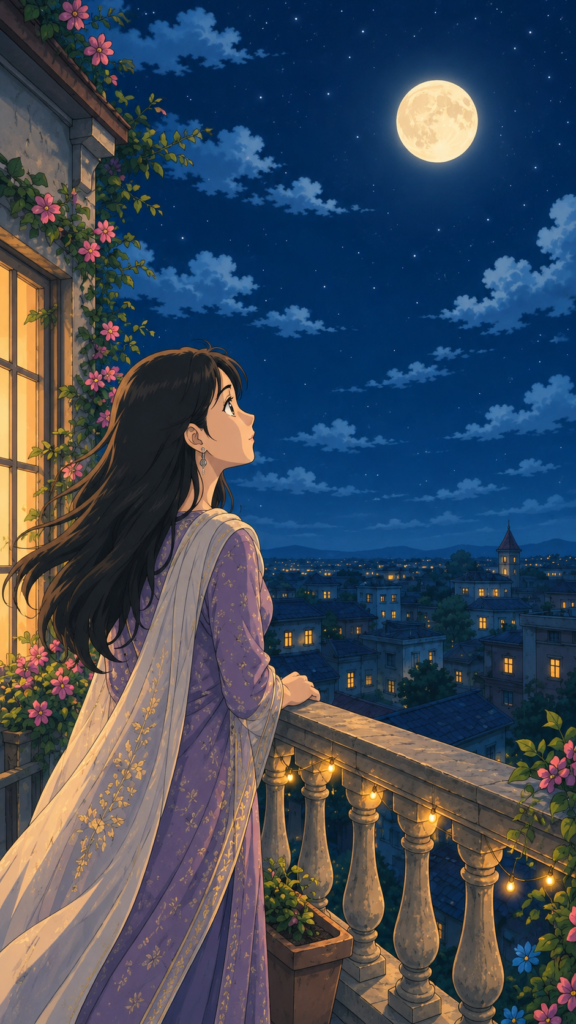
This Ghibli style AI prompt creates a calm, dreamy night scene: a young Indian woman in a lavender outfit stands on a flower-covered balcony, looking up at a huge golden full moon over a sleepy old town.
Below you’ll find the exact image prompt behind this artwork, a matching video prompt to bring it to life, and simple ways to make the scene your own.
Table of Contents
Why this Ghibli style AI prompt works
Many moonlit anime scenes look flat because everything is lit the same way. This prompt avoids that with a few deliberate choices:
- Two light sources. Cool blue moonlight from the sky and warm golden light from the window give the image depth and a cosy, nostalgic feeling.
- A character seen from behind. Showing her from behind and slightly to the side puts the viewer in her place. It also keeps the face simple, which is where AI images most often go wrong.
- Layered depth. Flowers and railing in the foreground, the woman in the middle, the town and moon far away. Three layers make a vertical frame feel cinematic.
- Clear placement. The prompt says where the moon goes (upper right) and where she stands (left foreground), so the composition stays balanced instead of random.
The Ghibli style AI prompt for the image (copy and paste)
Paste this into any AI image generator. It is written in labelled sections, so you can change one part without breaking the rest.
A breathtaking Studio Ghibli-inspired 2D anime illustration of a beautiful young Indian woman standing on a vintage European-style balcony at night, peacefully gazing at a magnificent glowing full moon in the deep blue sky.

Character: A young woman with very long, flowing, silky black hair, delicate facial features, expressive anime eyes, and a peaceful, dreamy expression. She is wearing an elegant lavender-purple traditional Indian outfit with subtle golden floral embroidery and a beautiful translucent cream-white dupatta draped over her shoulders, gently flowing behind her.

Environment: She is standing with both hands resting naturally on an old stone balcony railing. The balcony is decorated with beautiful pink flowers, green climbing vines, and small glowing golden fairy lights wrapped around the railing. On the left side, a large vintage window emits a warm golden-yellow light from inside the house.

Background: A breathtaking deep navy-blue night sky filled with countless tiny sparkling stars, soft fluffy blue clouds, and a large, luminous golden full moon in the upper-right portion of the frame. Below the balcony stretches a beautiful old European-style town with charming rooftops, distant buildings, a small church tower, and hundreds of tiny warm glowing windows.

Lighting and Atmosphere: Beautiful contrast between cool moonlight and warm golden window lighting. Soft moonlight gently illuminates the woman's face, hair, and clothes. Dreamy, peaceful, nostalgic, romantic nighttime atmosphere.

Art Style: High-quality Studio Ghibli-inspired hand-painted 2D anime aesthetic, delicate hand-drawn outlines, beautiful watercolor-like backgrounds, soft cel shading, rich environmental details, expressive anime character design, painterly textures, magical atmospheric depth, cinematic composition.

Composition: Vertical 9:16 portrait framing. Show the woman from behind and slightly from the side, occupying the left foreground. Keep the full moon clearly visible in the upper-right sky. The flower-covered balcony, glowing window, distant town, and night sky should all remain visible.

Quality: Ultra-detailed anime illustration, cinematic storytelling, beautiful color harmony, professional animation-film background art, 4K-quality appearance.

No text, no watermark, no extra people, no distorted anatomy, no photorealism.
The video prompt (copy and paste)
Use the finished image as the start frame in an image-to-video generator, then paste this prompt. Most of the words describe motion, because the image already holds the look.
Animate this image as a gentle 2D anime shot in a hand-painted, Studio Ghibli-inspired style. Vertical 9:16, 8 seconds, one continuous shot.

Camera: a very slow, smooth push-in from behind the woman toward the moon. Steady, no shake, no cuts.

Motion: a soft night breeze lifts strands of her long black hair and makes the cream-white dupatta ripple and float behind her. She breathes calmly, then slowly tilts her head a little higher toward the moon with a peaceful expression. Pink flowers and green vines on the railing sway lightly. The golden fairy lights twinkle softly. Fluffy blue clouds drift slowly across the sky, stars sparkle, and the full moon glows with a faint soft halo. Warm lights flicker gently in the windows of the distant town.

Lighting and Mood: cool silver-blue moonlight on her hair and clothes, warm golden glow from the window on the left. Calm, dreamy, nostalgic night atmosphere.

Style: keep the exact character, outfit, colours and composition from the image. Soft cel shading, painterly watercolour background, consistent line art, smooth anime motion.

Avoid: face or body morphing, extra people, extra fingers, flickering textures, camera shake, text, watermark, photorealism.
How to use this Ghibli style AI prompt, step by step
- Paste the image prompt into your AI image generator and set the aspect ratio to 9:16.
- Generate at least four versions. Pick the one with clean hands on the railing, a round moon and no strange shapes in the hair. Zoom in to check the details.
- Upscale the best image if your tool offers it, so the video starts from a sharp frame.
- Open an image-to-video generator, upload the image as the first frame and paste the video prompt. Choose a length of 5 to 8 seconds.
- Keep motion settings low. Strong motion tends to warp the face, the hands and the flowing dupatta.
- Add royalty-free soft piano or flute music with gentle night sounds like crickets and a light breeze, then export for Shorts, Reels or TikTok.
Easy ways to customise the scene
- Outfit: swap the lavender-purple outfit for an emerald-green saree, a deep red lehenga or a white kimono-style robe, and change the embroidery colour to match.
- City: replace the old European-style town with an old Indian city of domes and temple spires, a Japanese hillside town with tiled roofs, or a whitewashed seaside village.
- Time of day: turn the night sky into a golden-hour sunset with pink and orange clouds, and swap the moonlight line for warm sunset light.
- Weather and season: add gently falling snow, drifting cherry blossom petals or light monsoon rain with glowing puddles below.
- Small story details: a sleeping cat on the railing, a cup of chai or paper lanterns in the distance make the scene feel lived-in.
- Wallpaper version: change the framing to 16:9 landscape and keep the woman on the left third with the moon on the right.
Tips for a cleaner result
- Keep the last line of the Ghibli style AI prompt. Without no photorealism, many generators drift toward a glossy 3D look.
- If the hands look wrong, add hands partly hidden by the dupatta to the Environment section, or simply regenerate.
- If the moon comes out too small, add large moon filling a fifth of the sky to the Background section.
- In the video, avoid big actions like walking or turning around. Small, slow movements keep the character consistent from the first frame to the last.
- Keep the Character section exactly the same when you make a series, so every image looks like the same girl.
FAQ
Is this official Studio Ghibli artwork?
No. This is an original AI-generated illustration inspired by the hand-painted look of classic Japanese animated films. It is not affiliated with or endorsed by Studio Ghibli.
Can I use these prompts for my own videos?
Yes, this Ghibli style AI prompt and the video prompt are free to copy, edit and use. For commercial use of the images or videos you create, check the terms of the AI tool you generate them with, because rights differ from tool to tool.
What aspect ratio should I use?
Use 9:16 for YouTube Shorts, Instagram Reels and TikTok, 4:5 for an Instagram feed post and 16:9 for YouTube videos or desktop wallpapers. Update the Composition section whenever you change it.
Why does my image look 3D instead of hand-drawn?
Put the style words early in the prompt (2D, hand-painted, cel shading, watercolour background) and end it with no photorealism, no 3D render.
Try the Ghibli style AI prompt, change one section at a time and see how far you can take the scene. For more ideas, browse the AI Prompts section.