Ghibli Style AI Prompt: Free Image + Video Prompts for a Stunning Beach Scene
Looking for a Ghibli style AI prompt that actually gives you that calm, hand-painted anime feeling? Below you’ll find the exact image prompt and video prompt I used to create this lonely beach scene for Pixel Shorts Production, word for word, with a copy button on each one.
You also get a simple breakdown of why each line works, step-by-step instructions, easy variations and fixes for the most common problems. Copy the prompts, change one or two words and make the scene your own.
- What you get: 1 image prompt, 1 video prompt and 1 negative prompt
- Style: Studio Ghibli-inspired, hand-painted anime
- Format: vertical 9:16, made for Reels, Shorts and phone wallpapers
- Cost: the prompts are free to copy and use
What Is a Ghibli Style AI Prompt?
A Ghibli style AI prompt is a text description that asks an AI image or video generator to copy the feeling of classic hand-drawn Japanese animation: soft painted skies, detailed backgrounds, gentle light and quiet, emotional moments. The look is inspired by the films of Studio Ghibli, the Japanese animation studio famous for its painterly worlds.
The secret is not the word “Ghibli” alone. A strong prompt describes the subject, the setting, the colours, the mood, the art style and the camera position. If you leave any of these out, the AI guesses, and it usually guesses wrong.
The Ghibli Style AI Prompt for the Image
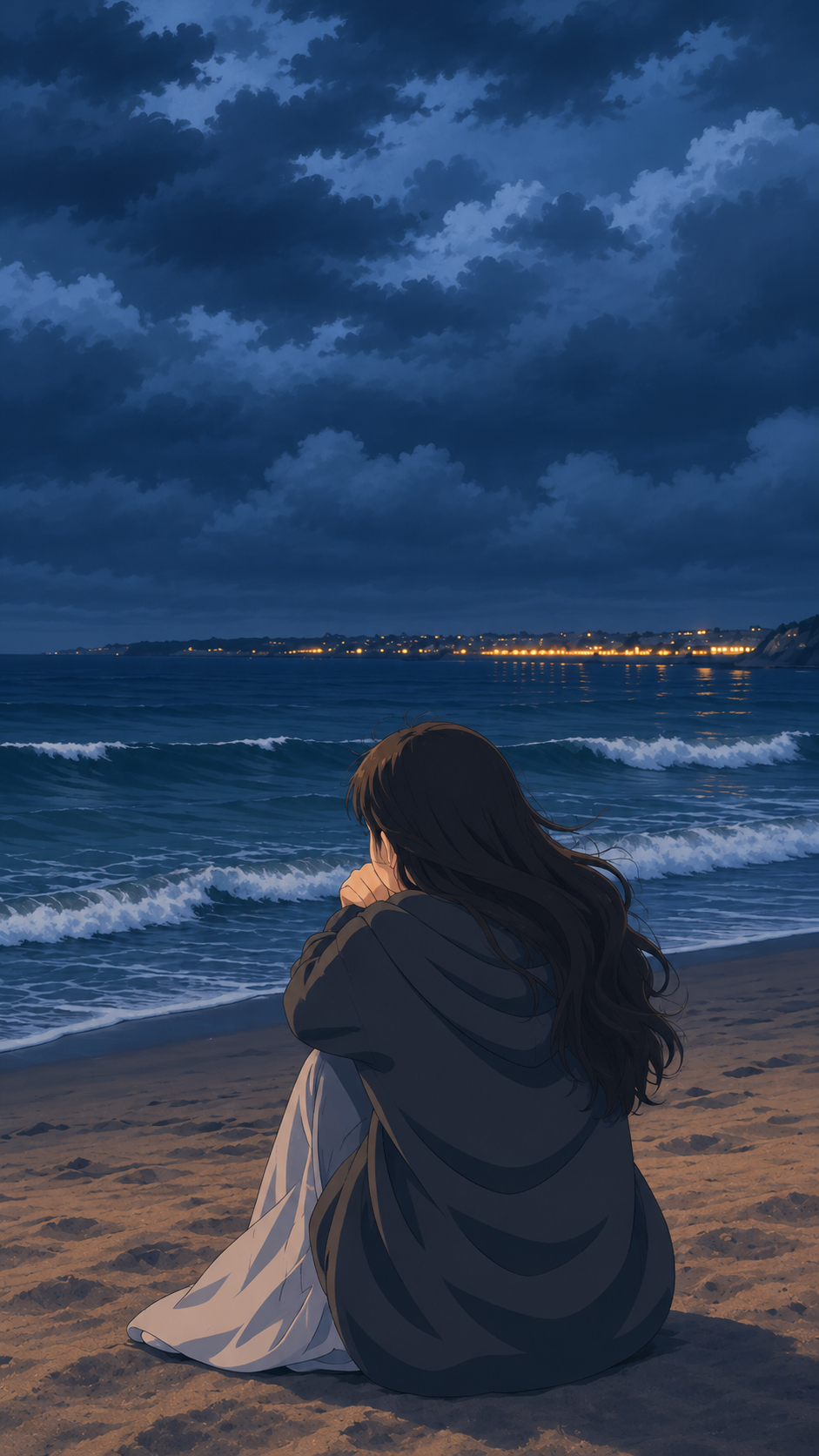
This is the full image prompt. It creates a girl sitting alone on the sand at dusk, a dark stormy sky and a city glowing on the far shore. Copy it exactly the first time, then start changing details.
A beautiful Studio Ghibli-inspired anime illustration of a young woman sitting alone on a sandy beach at dusk, viewed from behind. She is sitting with her knees drawn close to her chest, wrapped in an oversized dark charcoal-grey hoodie or blanket, with a soft pale-grey fabric draped around her legs. Her long, thick, dark brown hair flows gently in the sea breeze, with a few loose strands moving naturally.

In front of her stretches a vast deep-blue ocean with rolling waves and delicate white foam washing toward the shore. Across the distant horizon, a coastal city glows with tiny warm golden lights, reflecting faintly on the dark water. Above the ocean is an enormous dramatic sky filled with layered, heavy storm clouds in shades of navy blue, slate blue, muted indigo, and soft blue-grey, with subtle lighter patches of twilight breaking through the clouds.

The beach is textured with dark, wet sand and subtle warm brown tones. The entire scene feels peaceful, melancholic, introspective, cinematic, and emotionally atmospheric, capturing a quiet moment of solitude by the sea.

Hand-painted Studio Ghibli-inspired anime aesthetic, beautifully detailed environmental backgrounds, delicate hand-drawn outlines, soft painterly textures, atmospheric perspective, cinematic composition, subtle watercolor shading, natural color grading, realistic anime proportions, intricate clouds and ocean waves, gentle ambient lighting, highly detailed illustration.

Composition: vertical 9:16 portrait, woman positioned in the lower center of the frame, ocean in the middle, distant city lights along the horizon, enormous dramatic cloudy sky occupying the upper half of the image. Camera positioned behind the woman at a slightly elevated angle. Preserve the quiet, lonely, dreamy, blue-toned atmosphere.

No text, no watermark, no additional people, no exaggerated anime features, no bright sunlight, no oversaturated colors.
Save this Ghibli style AI prompt somewhere safe. It is the base for every variation further down this page.
Why this image prompt works
- The subject is seen from behind. The pose feels personal, and you avoid face distortions, the most common AI mistake.
- The sky has real colour names. Navy, slate blue, indigo and blue-grey give the clouds depth instead of one flat blue.
- There is one warm accent. Tiny golden city lights are the only warm colour, so your eye goes straight to the horizon.
- The composition is spelled out. Where she sits, where the horizon falls and the camera angle are all stated, so the layout comes out right.
- There is a clear “no” list. No text, no bright sun and no oversaturated colours keep the image calm and clean.
The Ghibli Style AI Video Prompt
To turn the still image into a short clip, use it as the first frame in an image-to-video tool and paste the prompt below. It adds strong wind, crashing waves, moving clouds and distant lightning, while the girl and the camera stay perfectly still.
A cinematic Studio Ghibli-inspired anime scene of a woman sitting alone on a sandy beach at dusk, facing the dark ocean. The weather is extremely windy, with powerful gusts of wind continuously blowing her long black hair wildly across her shoulders and face, making her oversized hoodie and loose skirt flutter dramatically. The ocean waves are rough and turbulent, crashing violently against the shore with white foam. Dark, heavy storm clouds move rapidly across the sky. Occasional bright lightning flashes illuminate the clouds and ocean in the distance, creating dramatic blue-white flashes across the entire scene. There is absolutely no rain. The beach remains dry except for the natural wet shoreline from ocean waves. The atmosphere is melancholic, peaceful yet stormy, emotionally cinematic and deeply atmospheric.

Motion details:
* Strong wind continuously blowing her hair from side to side.
* Hoodie fabric and skirt flutter naturally in the gusts.
* Waves rise, crash, and roll toward the shore.
* Dark clouds move slowly but visibly across the sky.
* Lightning flashes briefly in the distant sky, illuminating the scene momentarily.
* Sand subtly shifts with the wind.
* The woman remains seated in the same position, quietly watching the ocean.
* Natural atmospheric motion, realistic fluid animation.

Camera: Fixed static camera, no zoom, no pan, no dolly, no orbit, no camera shake. Maintain the exact composition and framing.

Style: Beautiful hand-painted Ghibli-inspired anime, detailed atmospheric backgrounds, cinematic dark blue and teal color palette, dramatic lighting, soft painterly textures, 2D animation, emotional storytelling, 9:16 vertical aspect ratio.
Paste this into the negative prompt field, if your tool has one:
Rain, drizzle, raindrops, wet clothing, umbrella, camera movement, camera zoom, camera shake, changing character position, changing outfit, face distortion, extra limbs, unnatural hair movement, blurry image, sunlight, bright daytime, excessive lightning, flickering scene, sudden transitions.
Why this video prompt works
- The camera is locked. “No zoom, no pan, no dolly” keeps the frame identical to your image, so nothing warps or drifts.
- Every motion gets its own line. Hair, fabric, waves, clouds, lightning and sand are listed one by one, so each element moves on purpose.
- Rain is ruled out twice. Storm clouds usually bring rain. Saying “absolutely no rain” and adding rain to the negative prompt keeps the beach dry.
- The character stays put. “Remains seated in the same position” stops the AI from making her stand up or change outfit.
How to Use These Prompts Step by Step
Here is how to get the best result from this Ghibli style AI prompt in any image and video generator.
- Generate the image first. Paste the image prompt into your AI image generator and set the aspect ratio to 9:16.
- Pick the best result. Make a few versions and choose the one with clean hands, natural hair and a clear horizon.
- Upload it to an image-to-video tool. Use the image as the start frame so the video keeps the same look.
- Paste the video prompt and negative prompt. Keep the camera instructions exactly as written.
- Generate, then check the motion. If the hair moves too much or the scene flickers, see the fixes below and try again.
- Finish your edit. Add soft music or wind and wave sounds, and the clip is ready for Reels or Shorts.
- Reuse the same Ghibli style AI prompt for a series. Keep the style and composition lines, change only the subject, and your posts will look like one collection.
5 Easy Variations to Try
Change one phrase at a time and keep everything else the same. That is the fastest way to learn what each part of a Ghibli style AI prompt does.
If you add rain in a variation, remember to remove “rain” from the negative prompt too.
Common Problems and Quick Fixes
Even a well-written Ghibli style AI prompt can go wrong sometimes. These quick fixes solve the most common issues.
| Problem | Quick fix |
|---|---|
| The image looks like 3D or a photo | Keep “hand-painted”, “2D” and “watercolor shading” in the prompt, and add “3D render, photorealistic” to the negative prompt. |
| Colours are too bright | Keep “no oversaturated colors” and “no bright sunlight”, and name darker shades like navy and slate. |
| The camera moves in the video | Keep the full camera line and put “camera movement, camera zoom” in the negative prompt. |
| Hair moves strangely | Lower the motion strength if your tool has it, and keep “unnatural hair movement” in the negative prompt. |
| The scene flickers | Remove “occasional bright lightning flashes” or change it to “one soft lightning flash far away”. |
How to Write Your Own Ghibli Style AI Prompt
Every good Ghibli style AI prompt follows the same simple formula. Fill in each part in this order:
- Subject: who or what, and what they are doing.
- Setting: where it happens and what is around them.
- Light and colour: time of day plus 3 or 4 named colours.
- Mood: 2 or 3 feeling words, like peaceful or nostalgic.
- Style: hand-painted anime, soft painterly textures, detailed backgrounds.
- Composition: aspect ratio, where the subject sits and the camera angle.
- Negatives: what you do not want, such as text or extra people.
Use the image prompt above as your template and swap in your own subject. You’ll get a consistent look across a whole series of posts.
FAQ
What is the best Ghibli style AI prompt for beginners?
Start with a simple scene, one person in a calm place, and describe the sky, colours, mood and camera angle. The beach prompt on this page is a good template because every part is clearly separated.
Can I use these prompts for free?
Yes. Copy, edit and use both prompts for your own images and videos.
Which aspect ratio should I use?
Use 9:16 for Instagram Reels, YouTube Shorts and phone wallpapers. For a desktop wallpaper or YouTube video, change it to 16:9 and move the subject slightly to one side.
Can I use a Ghibli style AI prompt for videos?
Yes. Create the image first, then animate it with an image-to-video tool and a prompt that describes only the motion, like the video prompt above.
Is it okay to make Ghibli-inspired AI art?
Making art inspired by a general style is common, but don’t copy real Studio Ghibli characters, scenes or logos, and don’t present your work as official Studio Ghibli art.
More prompts like this
Want another Ghibli style AI prompt? Every image and video I post on Pixel Shorts Production gets its exact prompt here. Browse the prompt gallery.