Anime City Night Prompt: Stunning Ghibli-Style Skyline Art (7 Mistakes to Avoid)
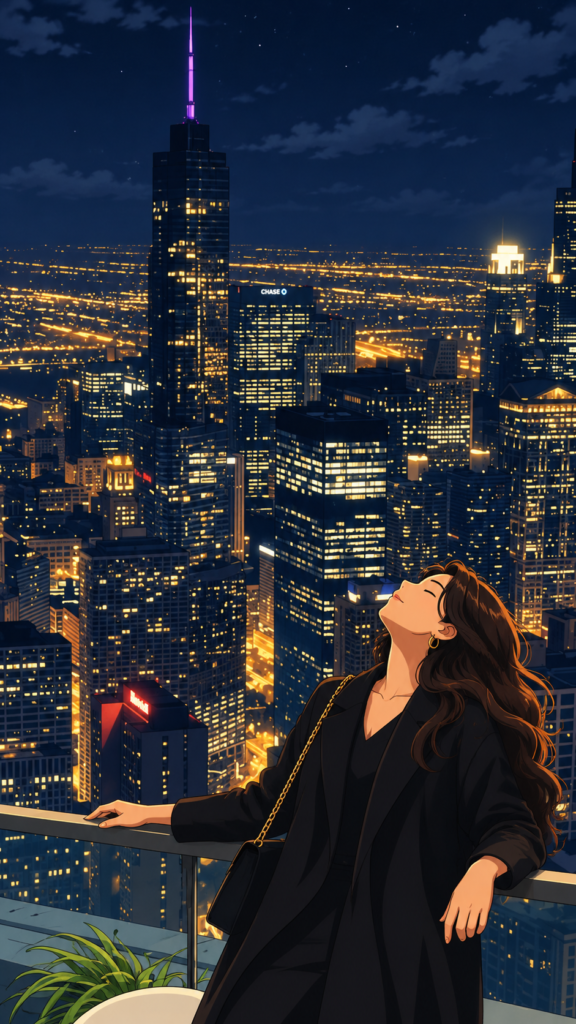
This anime city night prompt captures a feeling most people know: stepping onto a rooftop after a long day, closing your eyes and letting the night air hit your face while the whole city glows below. The scene is painted in a soft, Ghibli-inspired anime style, but the setting is a modern skyline of glass towers and endless lights.
City scenes are harder to generate than nature scenes. There are more straight lines, more lights and more chances for something to go wrong. So after the image and video prompts, this guide walks through the seven mistakes that ruin most skyline images and exactly how to fix each one.
Table of Contents
What this anime city night prompt creates
A vertical 9:16 illustration of a young woman in a long black coat leaning back against a glass rooftop railing high above a city. Her eyes are closed and her face is tilted up toward the sky with a small, relieved smile. Behind her, skyscrapers glow with thousands of warm windows, one tall tower ends in a violet-lit spire, and the streets below fade into a golden grid that runs all the way to the horizon.
Small touches make it feel real: a thin gold necklace, a chain-strap shoulder bag, a potted plant in the corner of the terrace. They tell you this is someone who just stepped out of a dinner or an office, not a model posing for a photo.
The anime city night prompt for the image (copy and paste)
Paste this into your AI image generator. The lighting section is longer than usual on purpose, because city lights are what make or break this kind of scene.
A cinematic 2D anime illustration in a hand-painted, Studio Ghibli-inspired style. A young woman stands on the terrace of a skyscraper rooftop at night, leaning back against a glass railing, eyes closed, face tilted up toward the sky, enjoying the cool night air above a huge glowing city.

Character: long, wavy, dark-brown hair falling past her shoulders. She wears a long, loose black wool coat over a simple black top, a thin gold necklace and small gold earrings, with a black shoulder bag on a thin gold chain strap. One arm rests along the top of the railing, the other hand rests on the edge behind her. Calm, relieved, a soft hint of a smile.

Environment: a modern rooftop terrace with a glass and steel railing, a potted green plant and the edge of a small round white table in the lower-left corner.

City: a vast city skyline at night stretching to the horizon. Tall glass skyscrapers with thousands of warm yellow windows, many dark ones in between, one very tall tower topped with a thin violet-lit spire, a small red glowing sign on a lower building, and streets below forming a golden grid of lights that fades into the distance.

Sky: deep navy-blue sky with soft dark clouds and a faint glow above the city.

Lighting and Mood: warm golden city light from below lighting her face and hair, cool blue from the sky above. Peaceful, free, quietly confident.

Art Style: Studio Ghibli-inspired hand-painted anime, clean line art, soft cel shading, painterly background with crisp but simplified building shapes, glowing points of light.

Composition: vertical 9:16. The woman stands in the lower-right part of the frame, shown from the hips up. The tallest tower rises on the upper left. Strong sense of height.

No text, no readable signs, no logos, no watermark, no extra people, no distorted hands, no photorealism, no 3D render.
The windy video prompt (copy and paste)
Rooftops are windy, so this video prompt leans into it. Use the image as the first frame and paste the text below.
Animate this image as a smooth 2D anime shot in a hand-painted, Studio Ghibli-inspired style. Vertical 9:16, 8 seconds, one continuous shot.

Camera: a slow, gentle orbit a few degrees to the left around the woman while rising slightly, revealing a little more of the city below. Smooth, no shake, no cuts.

Wind and Motion: a strong, cool rooftop wind blows from the right. Her long wavy hair streams and flutters across her shoulders and behind her. The long black coat flaps and ripples at the hem and collar. The leaves of the potted plant shake in the wind. She takes a slow, deep breath, her shoulders rise and fall, and her soft smile grows a little. Her eyes stay closed. Clouds move quickly across the sky. City lights twinkle, and tiny car lights flow along the streets far below. The violet light on the tower spire pulses slowly.

Lighting and Mood: warm golden glow from the city on her face, cool blue sky above. Free, peaceful, end-of-the-day relief.

Style: keep the exact character, outfit, colours and composition. Consistent line art, soft cel shading, smooth motion.

Avoid: eyes opening, face changing, extra fingers, bag or necklace disappearing, buildings bending or melting, flicker, camera shake, text, watermark, photorealism.
7 mistakes that ruin an anime city night prompt (and how to fix them)
1. Asking for too many lights
If every window glows, the city turns into a bright orange blur. Ask for thousands of warm windows, with many dark ones in between. The dark gaps are what make the lights read as lights.
2. Forgetting where the light comes from
In a night city scene the brightest light sits below the character, not above. If you skip the lighting line, her face often comes out flat and grey. Writing warm city light from below lighting her face fixes it.
3. Letting signs turn into fake text
Generators love to write gibberish on billboards. Add no readable signs, no logos and describe signs only by colour, such as a small red glowing sign.
4. Wobbly buildings
Curved or melting towers break the illusion instantly. The words crisp but simplified building shapes keep straight edges while staying in an illustrated style. In video, add buildings bending or melting to the Avoid line.
5. No sense of height
Without a clue to the height, a rooftop looks like an ordinary balcony. Include the street grid far below and the phrase strong sense of height, and show the railing so the viewer knows where the edge is.
6. A busy outfit
Patterns, logos and piles of accessories fight with the city lights. A plain black coat lets the skyline stay the star, and two tiny gold details are enough to catch the eye.
7. Too much movement in the video
A rooftop scene invites dramatic camera moves, but fast swoops make buildings warp. A small orbit and a slight rise are plenty. Let the wind in her coat and hair supply the energy.
How to make it, step by step
- Paste the anime city night prompt into your image generator and set the ratio to 9:16.
- Generate four to six versions. Pick one with straight buildings, clean hands on the railing and no fake text on signs.
- Zoom in on her face. Closed eyes should look relaxed, not squinting.
- Upscale the best image so the small city lights stay sharp.
- In an image-to-video generator, load the image as the first frame, paste the windy video prompt and choose 5 to 8 seconds.
- Start with low motion. If the coat barely moves, raise it one step at a time.
- Add a soft city ambience track with distant traffic and wind under a mellow beat, then export.
Easy ways to change the scene
- Golden hour: replace the night sky with a sunset, orange light on the glass towers and the first windows switching on.
- Rainy night: add light rain, a wet terrace floor reflecting the lights and a clear umbrella.
- Different city mood: describe neon pink and teal lights for a futuristic look, or low brick buildings and church towers for an old European city.
- Winter: add a cream scarf, visible breath in the cold air and a few snowflakes caught in the wind.
- Landscape version: switch to 16:9, place her on the right third and let the skyline fill the left two thirds.
FAQ
Is this official Studio Ghibli artwork?
No. It is an original AI-generated illustration inspired by the hand-painted look of classic Japanese animated films. It is not affiliated with or endorsed by Studio Ghibli.
Why do my buildings look 3D?
Put 2D, hand-painted and painterly background near the start of your anime city night prompt, and end it with no photorealism, no 3D render.
Can I use these prompts for my videos?
Yes, the prompts are free to copy, edit and use. For commercial use of the images or videos you create, check the terms of the AI tool you generate them with, because rights differ from tool to tool.
Use the anime city night prompt exactly as written once, then fix anything that looks off with the seven mistakes above. For a quieter version of this mood, try the lofi anime girl rooftop prompt, read how camera movement prompts work, or browse the AI Prompts section for more ideas.